
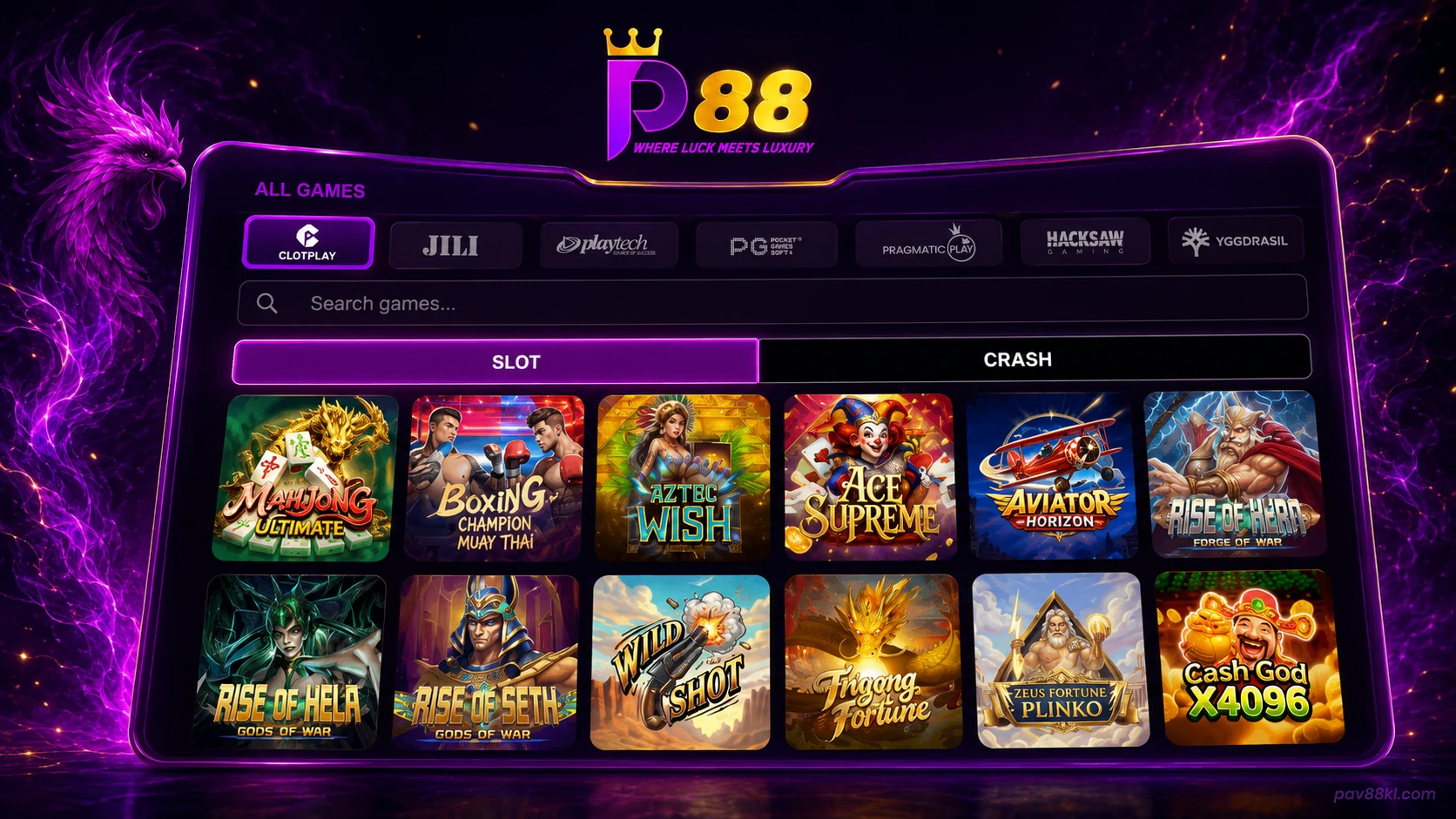
Pavilion88 Game Lobby
The main lobby places game cards in the centre of the page. Provider tabs appear above the search field, while category tabs sit above the game grid.
Members can use the lobby to:
- search for a title;
- filter games by provider;
- move between slot and crash categories;
- open a game card;
- return to account, promotion and support functions;
- view sports panels from the same member area.
The game grid allows several titles to remain visible at once. This reduces the number of menus required to find a game.
Pavilion88 Slot Games
Slots form the main category shown in the supplied Pavilion88 interface. Each game appears as a card with artwork, a title and an entry control.
The slot area includes different visual and play formats. Members may find classic reel layouts, feature-based video slots, jackpot-style titles and branded themes in the same category.
The available list depends on the current provider catalogue. A game shown in an old screenshot may be removed, renamed or placed under maintenance.
Use the search field when a known title is not visible in the first row. Provider filters can also reduce the number of displayed games.
Crash Games
Crash games use a separate category tab in the Pavilion88 lobby. Members can switch from slots without leaving the account area.
These games use short rounds and changing multiplier mechanics. The live game screen controls the round status, result and available action.
Pavilion88 does not guarantee a result, return or winning pattern. Members should set a budget before entering any crash game.
Game Providers
Provider tabs allow members to narrow the lobby by studio. The supplied interface shows labels for:
- Clotplay;
- JILI;
- Playtech;
- Pragmatic Play;
- Rich Gaming.
The live provider list may contain more or fewer entries. Clotplay, JILI, Playtech, Pragmatic Play, Rich Gaming and PG Soft must be checked against the active lobby before publication.
Selecting a provider updates the game cards shown below the tabs. Members can return to the full lobby by choosing the general category or clearing the selected filter.
Do not create a provider page when Pavilion88 has no active games from that studio. Provider names, logos and game lists must match the live lobby.
Search and Category Filters
The game search accepts a title or part of a title. Results appear inside the current lobby view.
Category tabs separate the main game groups. The supplied interface shows Slot and Crash as the primary casino categories.
A search result may be empty when:
- the title is unavailable;
- the provider has removed the game;
- the spelling does not match the listed title;
- maintenance is active;
- the selected provider filter excludes the title.
Clear the search and provider filter before checking again.
Featured Games

Featured placement should reflect the live Pavilion88 lobby. A title should not be marked as featured because it appeared in an old screenshot or marketing image.
Before publication, each featured card must confirm:
- current game title;
- active provider;
- correct thumbnail;
- working destination;
- supported device;
- current category;
- any country or account restriction.
The final featured list will use the signed-in Pavilion88 game lobby at https://pav88kl.com/login.
Cockfight artwork
The supplied Cockfight banner can appear on this page only when a live Pavilion88 Cockfight category or game destination is confirmed.
Do not keep the embedded “More Info” control as a working CTA. Any action must use semantic HTML outside the image.
Sports Section
The Pavilion88 Malaysia interface includes sports panels beside the casino game grid. These panels show event information and available market options from the member lobby.
Sports events, teams, start times and odds change frequently. The page should not hard-code match data from a screenshot.
Members should rely on the live Pavilion88 panel for:
- event status;
- start time;
- team names;
- market availability;
- current odds;
- settled result.
Casino game content and sports content should remain clearly separated in the page layout.
Games on Mobile
The Pavilion88 mobile route keeps game search, categories and provider filters available on supported phones and tablets.
The number of cards shown in each row changes with screen size. Game functions remain connected to the same Pavilion88 member account.
Android, iPhone and mobile-browser access methods are listed on the Pavilion88 APK.
A game may require a stronger connection or a newer browser than the main lobby. Close other tabs and reload the game when performance drops.
Open a Pavilion88 Game
Members must sign in before opening account-based game functions.
After login:
- Select the required category.
- Use the search field or provider tab.
- Open the game card.
- Check the balance and game controls.
- Set a budget before starting.
A game should be closed when the title, provider or destination does not match the Pavilion88 lobby.
The Pavilion88 account login contains the current account-access route.
Game Loading Problems
A game may fail to load because of connection problems, browser settings, maintenance or device limits.
Blank game screen
Refresh the game once. Close the tab and reopen the title from the Pavilion88 lobby when the screen remains blank.
Game stops during a round
Keep the round reference or screenshot. Check the transaction or game record before starting another round.
Provider tab shows no games
Clear the search field and select the general lobby. The provider may also be under maintenance.
Mobile controls do not fit the screen
Rotate the device, close browser zoom and reopen the game. Use the current mobile route from the Pavilion88 download page.
Result or balance does not update
Refresh the account balance and review the transaction or game record. Do not repeat a stake only because the display has not updated.
Open Pavilion88 Help when the problem continues.
Promotions and Game Eligibility
A Pavilion88 promotion may apply only to selected games, providers or categories.
Members should check:
- eligible game category;
- excluded titles;
- turnover contribution;
- maximum stake;
- promotion period;
- withdrawal condition.
Playing an excluded game may affect bonus eligibility or turnover progress. The Pavilion88 promo publishes the current campaign rules.
Responsible Gaming
Pavilion88 games involve financial risk. No game guarantees a win, return or recovery of previous losses.
Set a spending limit before opening a game. Stop after reaching that limit. Do not increase a stake to recover a loss.
Take regular breaks and close the account session when play affects money, work, sleep or relationships.
Our responsible gaming page covers limits, warning signs and support options.
Current Game Information
The live Pavilion88 lobby is the source for current games, providers and category status.
Game information last updated: 5 August 2026
Current game count: 100+ active games across slots, crash games and sports content
Do not publish a fixed game count until it has been checked against the active lobby.